Samsung firmware flashing, rebuilt for Mac.
OdinMac turns the familiar Odin workflow into a native Apple Silicon experience: load firmware slots, inspect partition decisions, and flash with visible guardrails.
Flash session
Plan before execution
Download Mode
Device-ready checks
Package review
Archive and slot validation
Flash guard
Explicit safety confirmations
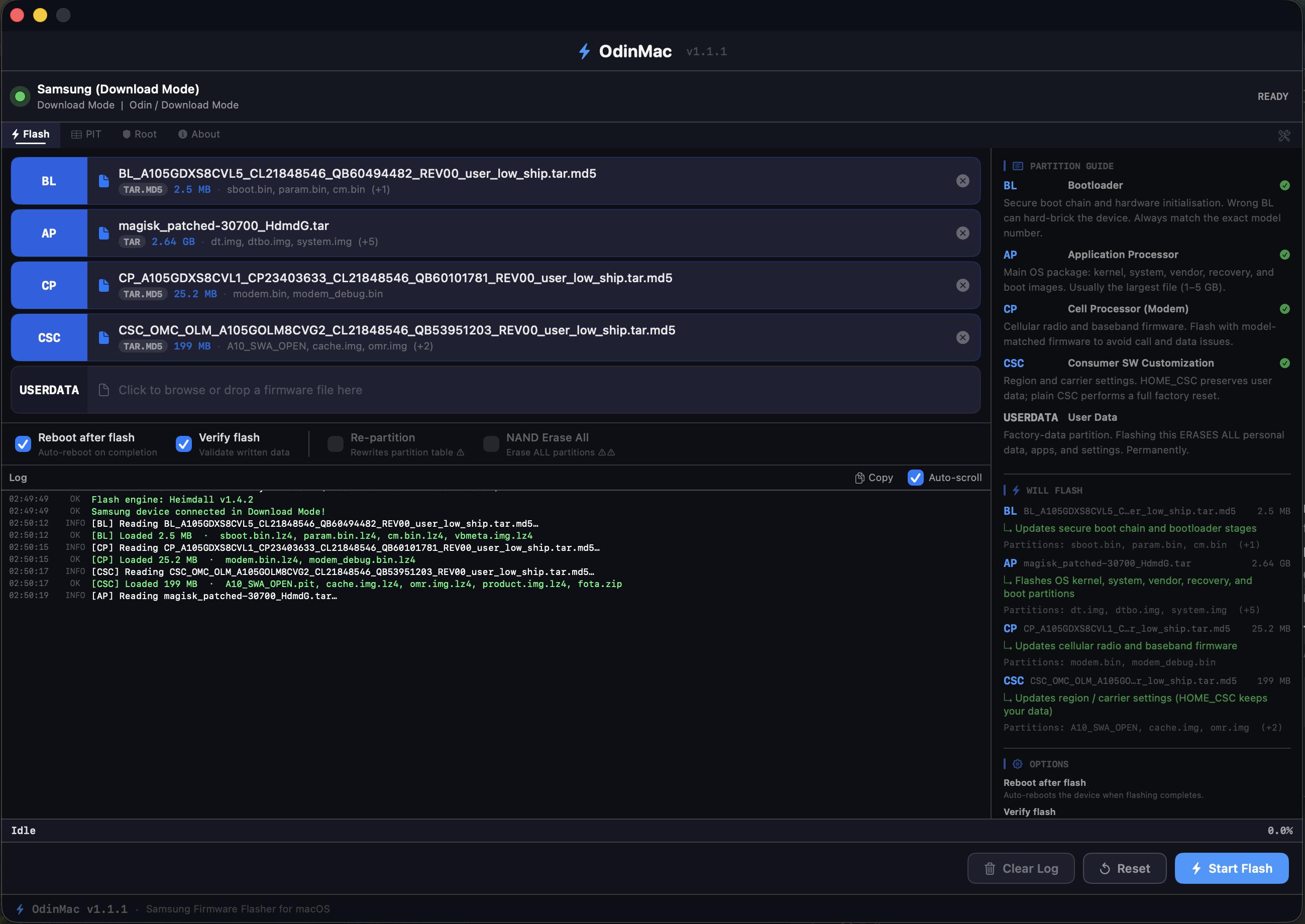
Samsung Odin for Mac
A focused firmware workspace without the Windows detour.
OdinMac keeps the complicated parts visible and understandable without turning firmware flashing into a wall of terminal output.
Built around the real workflow
From firmware package to monitored flash.
A clear path from matching firmware to completion, with the information you need visible at every step.
Match the exact firmware
Choose firmware for the precise Samsung model, bootloader family, and region you intend to flash.
Connect in Download Mode
Use a reliable USB data cable, enter Download Mode, and wait for OdinMac to show the device as ready.
Drop packages into slots
Place BL, AP, CP, CSC, HOME_CSC, or USERDATA in the matching Odin-style slot.
Review, confirm, flash
Check the partition guide and options, confirm guarded actions, then start the monitored flash.
Product demo
A short walkthrough, then the details.
Use the demo to understand the complete flow, then scan the technical decisions OdinMac keeps visible before a flash starts.
Full walkthrough
See the app move from device detection to flash readiness.
Slot guidance
Watch firmware packages land in their matching Odin-style slots.
Readable logs
Follow the status stream without switching into a terminal.
Designed for informed decisions
The details stay visible, not hidden.
The dedicated partition guide explains what every slot changes. Dangerous options stay clearly marked, while the compact log keeps real Heimdall output close without taking over the interface.
Partition aware
Understand BL, AP, CP, CSC, HOME_CSC, and USERDATA before flashing.
Dangerous actions guarded
Re-partition and NAND Erase All require explicit confirmation every time.
Real output
Copy compact Heimdall logs for troubleshooting, issue reports, and recovery planning.
Safety model
Abort rather than guess.
OdinMac validates mappings, prepares compressed images, removes duplicates, and checks Heimdall output before calling a flash successful.
Important
Firmware flashing always has risk.
Always use firmware for the exact device model, keep a reliable cable connected, and avoid Re-partition or NAND Erase All unless they are explicitly required.
Read the flashing guideInstall the latest macOS package.
Download the signed package from GitHub Releases and install OdinMac on an Apple Silicon Mac running macOS 13 or later.
Frequently asked
Questions before you flash.
Everything worth knowing before bringing a Samsung firmware workflow to your Apple Silicon Mac.
Is OdinMac free and open source?
Yes. OdinMac is completely free and fully open source. The full source code is available on GitHub at h4rithd/OdinMac, so you can review, build, or contribute to it yourself.
Which Macs does OdinMac support?
OdinMac runs natively on Apple Silicon Macs running macOS 13 or later. The current public build is packaged for macOS arm64.
Do I still need a Windows VM or Boot Camp?
No. OdinMac replaces the need for Windows Odin entirely, so there is no need for a Windows VM, Boot Camp, or any other compatibility layer to flash Samsung firmware.
What is Heimdall and why does OdinMac bundle it?
Heimdall is the open source, cross platform tool used to talk to Samsung devices in Download Mode. OdinMac bundles Heimdall with static libusb so it works out of the box with no separate driver installation.
Which firmware partitions can OdinMac flash?
OdinMac supports BL, AP, CP, CSC, HOME_CSC, and USERDATA partitions, each mapped to its matching slot with a dedicated partition guide that explains what every slot changes.
Is flashing firmware with OdinMac safe?
Firmware flashing always carries some risk, but OdinMac is built to reduce it. It validates partition mappings, refuses unknown or duplicate mappings, and guards destructive actions like Re-partition and NAND Erase All behind explicit confirmation.
Start flashing from the Mac you already use.
Download OdinMac and bring a focused native Samsung firmware workflow to your Apple Silicon Mac.